이번 팀프로젝트의 주제가 '알람 앱'이었는데, 기간은 오늘(05/23)까지였다. 그동안 블로그에 기록할 시간이 없어서 발생한 문제, 어려웠던 부분에 대해 메모만 해둔 채로 바쁘게 지냈는데 지금부터 천천히 작성해보려 한다.
Team Project : 일어나시계
Wire Frame 및 역할 분담
먼저, 이번 팀 프로젝트의 와이어 프레임은 피그마 레퍼런스를 참고했다.
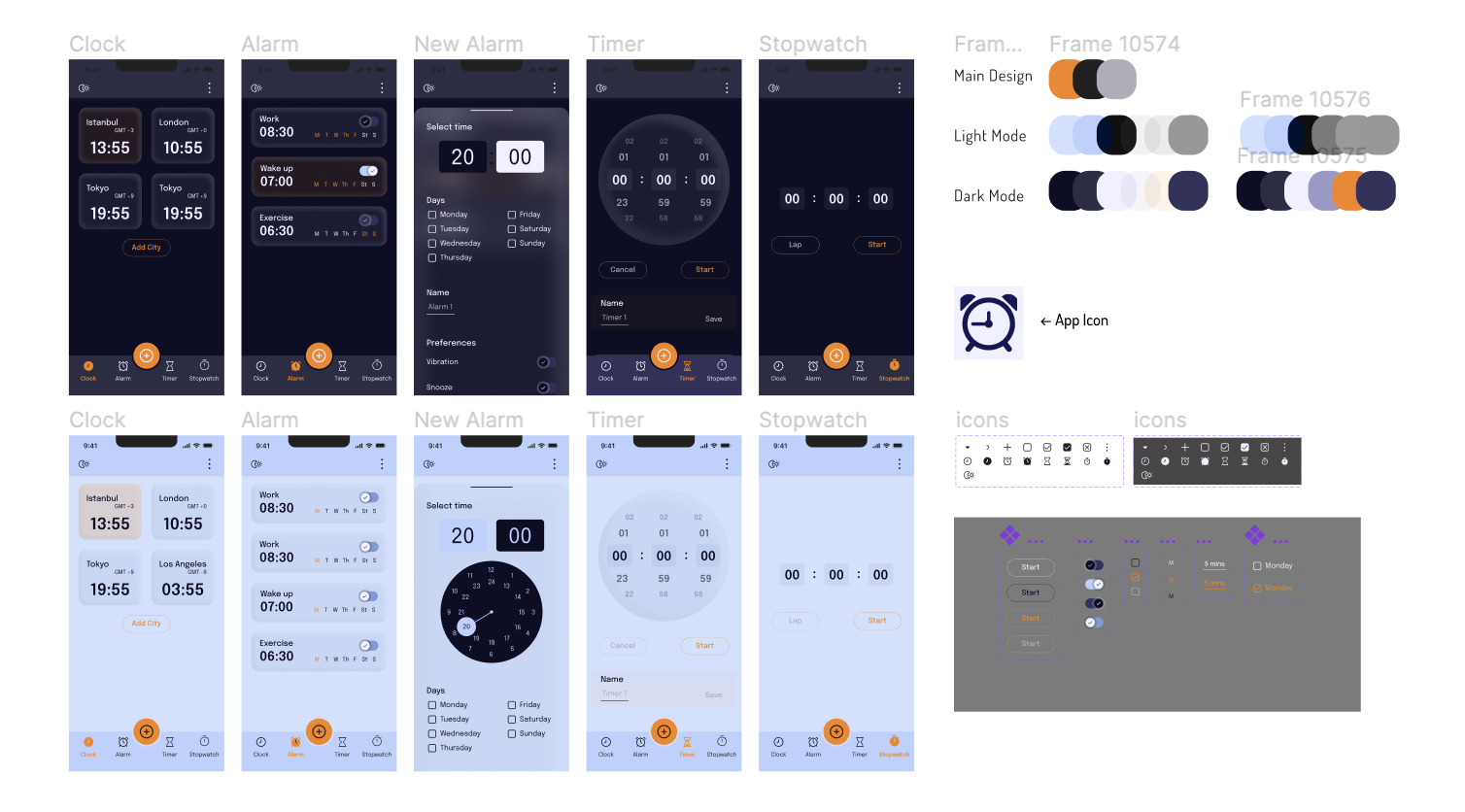
Glassmorphism Alarm App | Figma
Alarm Application with 3D Glass Effect With Dark Mode and Light Mode choices, it feels like two different applications! The use of a glass effect on background layers add a sense of depth and modernity to the design. This effect has become popular in UI/UX
www.figma.com
그리고 역할 분담은 총 4명의 팀원들이 탭 별로 한 페이지 씩 분담해서 구현하기로 했는데, 나는 두 번째 탭 페이지인 알람 리스트 페이지와 알람 Push Alarm 등을 구현하게 되었다.
진행 상황 공유
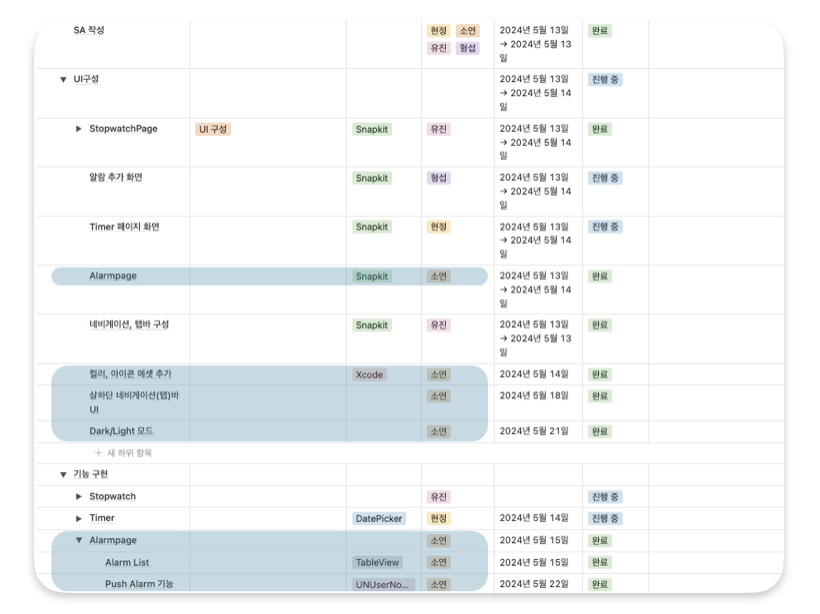
일단, 구현하며 제일 어려웠던
NotificationCenter.default.addObserver에 대해 먼저 설명해 보자면,
NotificationCenter.default.addObserver
addObserver 메서드는 객체를 NotificationCenter에 등록하여 특정 이름의 알림을 받을 수 있도록 합니다. 이 메서드를 통해 알림을 수신하는 객체와 알림을 게시하는 객체를 느슨하게 결합할 수 있습니다.
사용법
NotificationCenter.default.addObserver(self, selector: #selector(메서드명), name: Notification.Name, object: nil)
- self: 현재 뷰 컨트롤러 인스턴스
- selector: 알림을 받았을 때 실행할 메서드
- name: 관찰할 알림의 이름
- object: 알림과 연관된 객체 (선택 사항)
예시
override func viewDidLoad() {
    super.viewDidLoad()

// 키보드 알림 옵저버 등록
NotificationCenter.default.addObserver(self,
                                       selector: #selector(keyboardWillShow(_:)),
                                       name: UIResponder.keyboardWillShowNotification,
                                       object: nil)
}

// 키보드 알림 처리 메서드
@objc func keyboardWillShow(_ notification: Notification) {
	// 키보드 높이만큼 뷰 위치 조정
	// ...
}
요약
뷰 컨트롤러가 NotificationCenter에 자신을 등록하면, 관심 있는 알림이 발생했을 때 해당 메서드가 자동으로 호출됩니다. 이를 통해 다른 뷰 컨트롤러나 모델 객체에서 발생한 이벤트를 효과적으로 처리할 수 있습니다.
[ 문제 1 ]
TableView.reloadData() & NotificationCenter.default.addObserver
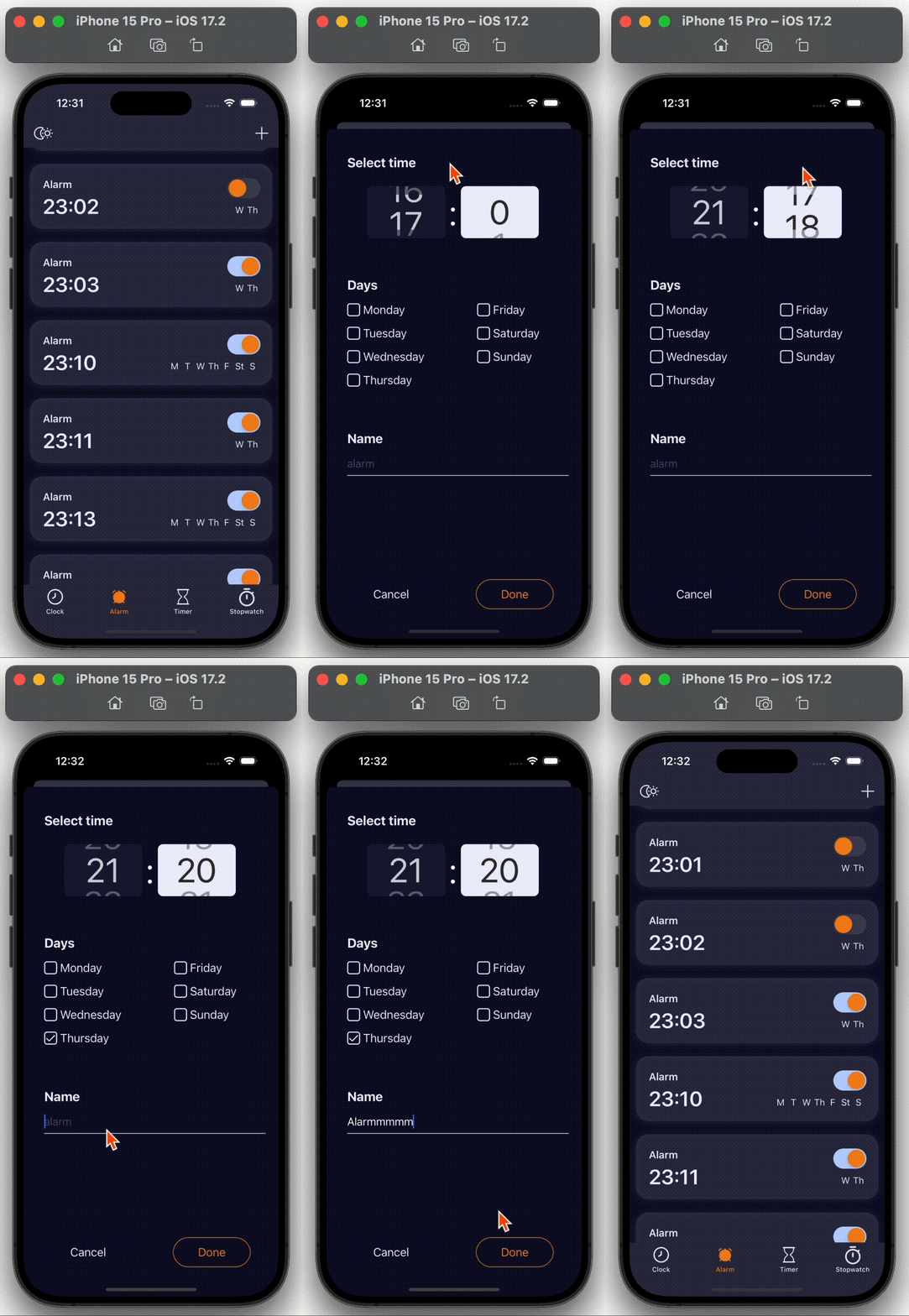
모달창(위 gif 참고)에서 추가 버튼 클릭 시 바로 알람 리스트 페이지에서 데이터가 추가되어야 하는데 바로 추가되지를 않고, 새로 어플을 리로드 하거나 탭 이동 시 리로드 되는 문제가 있었다.
처음에는 어떻게 연결해서 리로드 시켜야 할지 감이 오질 않아서 이것저것 서치를 하다 보니, 인스턴스 메서드인 addObserver(forName:object:queue:using:)을 사용해서 구현하면 된다는 말을 듣고 바로 시도해 보았다.
AlarmViewController.swift
// MARK: - Life Cycle
override func viewDidLoad() {
    super.viewDidLoad()

    setupTableView()

    NotificationCenter.default.addObserver(self, selector: #selector(modalDidDismiss), name: NSNotification.Name("ModalDidDismiss"), object: nil)

    fetchAlarmsFromCoreData()
}- AlarmViewController에서 ModalDidDismiss 알림을 수신하도록 관찰자를 설정
→ NotificationCenter.default.addObserver를 사용하는 viewDidLoad 메서드에서 실행된다.
→ selector: #selector(modalDidDismiss)는
'modalDidDismiss'이름의 알림이 수신되면 modalDidDismiss 메서드를 호출해야 함을 의미한다.
NewAlarmViewController.swift
// MARK: - 완료 버튼 선택
@objc private func doneButtonTapped(_ sender: UIButton) {
	// 생략
    NotificationCenter.default.post(name: NSNotification.Name("ModalDidDismiss"), object: nil)
    dismiss(animated: true, completion: nil)
}- NewAlarmViewController에서 NotificationCenter.default.post(name: NSNotification.Name("ModalDidDismiss"), object: nil)은 'ModalDidDismiss'이라는 이름의 알림을 보냄
AlarmViewController.swift
@objc func modalDidDismiss() {
    fetchAlarmsFromCoreData() // 모달이 닫힐 때마다 데이터를 다시 가져옴
    print("Modal 닫힘")
}- AlarmViewController는 NewAlarmViewController에서 보낸 'ModalDidDismiss' 알림을 수신하면 modalDidDismiss 메서드를 호출
→ modalDidDismiss는 데이터를 새로 고침하는 fetchAlarmsFromCoreData을 호출한다.
전체 코드
AlarmViewController.swift
// MARK: - Life Cycle
override func viewDidLoad() {
    super.viewDidLoad()

    setupTableView()

    NotificationCenter.default.addObserver(self, selector: #selector(modalDidDismiss), name: NSNotification.Name("ModalDidDismiss"), object: nil)

    fetchAlarmsFromCoreData()
}

deinit {
    NotificationCenter.default.removeObserver(self)
}

@objc func modalDidDismiss() {
    fetchAlarmsFromCoreData() // 모달이 닫힐 때마다 데이터를 다시 가져옴
    print("Modal 닫힘")
}
NewAlarmViewController.swift
// MARK: - 완료 버튼 선택
@objc private func doneButtonTapped(_ sender: UIButton) {
	// 생략
    NotificationCenter.default.post(name: NSNotification.Name("ModalDidDismiss"), object: nil)
    dismiss(animated: true, completion: nil)
}
[ 문제 2 ]
TableView Cell 삭제 시 다른 데이터가 삭제되는 문제
수정 전 코드
// MARK: - Cell Delete
func tableView(_ tableView: UITableView, trailingSwipeActionsConfigurationForRowAt indexPath: IndexPath) -> UISwipeActionsConfiguration? {

    let deleteAction = UIContextualAction(style: .destructive, title: "") { (action, view, completion) in
        self.deleteAlarmFromCoreData(at: indexPath.row)
        self.alarms.remove(at: indexPath.row)

        tableView.deleteRows(at: [indexPath], with: .fade)

        completion(true)
    }

    deleteAction.backgroundColor = UIColor(named: "backGroudColor")
    let trashImage = UIImage(systemName: "trash")?.withTintColor(UIColor(named: "textColor") ?? .gray, renderingMode: .alwaysOriginal)
    deleteAction.image = trashImage
    let configuration = UISwipeActionsConfiguration(actions: [deleteAction])

    return configuration
}

// MARK: - Delete Alarm from Core Data
private func deleteAlarmFromCoreData(at index: Int) {

    let appDelegate = UIApplication.shared.delegate as! AppDelegate
    let context = appDelegate.persistentContainer.viewContext
    let fetchRequest = NSFetchRequest<NSFetchRequestResult>(entityName: "MyAlarm")

    do {
        let result = try context.fetch(fetchRequest)

        if result.count > index {
            let objectToDelete = result[index] as! NSManagedObject
            context.delete(objectToDelete)
            try context.save()
        } else {
            print("삭제~")
        }
    } catch {
        print("Core Data에러: \(error.localizedDescription)")
    }
}
수정 후 코드
// MARK: - Cell Delete
func tableView(_ tableView: UITableView, trailingSwipeActionsConfigurationForRowAt indexPath: IndexPath) -> UISwipeActionsConfiguration? {

	let deleteAction = UIContextualAction(style: .destructive, title: "") { (action, view, completion) in
        let alarmToDelete = self.alarms[indexPath.row]
        self.deleteAlarmFromCoreData(alarm: alarmToDelete)
        self.alarms.remove(at: indexPath.row)

        tableView.deleteRows(at: [indexPath], with: .fade)

        completion(true)
    }

    deleteAction.backgroundColor = UIColor(named: "backGroudColor")
    let trashImage = UIImage(systemName: "trash")?.withTintColor(UIColor(named: "textColor") ?? .gray, renderingMode: .alwaysOriginal)
    deleteAction.image = trashImage
    let configuration = UISwipeActionsConfiguration(actions: [deleteAction])

    return configuration
}

// MARK: - Delete Alarm from Core Data
private func deleteAlarmFromCoreData(alarm: Alarm) {
    guard let appDelegate = UIApplication.shared.delegate as? AppDelegate else {
        return
    }

    let context = appDelegate.persistentContainer.viewContext
    let fetchRequest = NSFetchRequest<NSFetchRequestResult>(entityName: "MyAlarm")
    fetchRequest.predicate = NSPredicate(format: "id == %@", alarm.id as CVarArg)

    do {
        let result = try context.fetch(fetchRequest)
        if let objectToDelete = result.first as? NSManagedObject {
            context.delete(objectToDelete)
            try context.save()
        }
    } catch {
        print(error.localizedDescription)
    }
}
기존 코드에서 TableVIew Cell 삭제 후 새로운 알람 추가 또는 App 재로딩 시 삭제했던 Cell이 아닌 다른 Cell이 삭제되는 문제가 있었다.
확인해 보니 기존에는 Core Data에서 데이터를 삭제할 때 인덱스를 기반으로 데이터를 삭제하고 있었는데, 이 경우 Core Data의 인덱스가 항상 일치하지 않을 수 있다는 점을 놓쳤고 그렇기 때문에 다른 데이터가 삭제되는 문제가 발생한 것 같다.
이를 해결하기 위해 deleteAlarmFromCoreData(alarm:) 메서드로 Alarm 객체를 직접 전달하였고 fetchRequest에서 NSPredicate를 사용하여 id 속성을 기준으로 특정 객체를 삭제하도록 수정했다.
그러니까 인덱스를 사용하는 대신 특정 Alarm 객체를 기준으로 삭제되므로, 테이블 뷰와 Core Data 동기화 문제를 해결하였다.
[ 어려웠던 부분 ]
Push Alarm & UNUserNotificationCenter을 통한 알람 예약
scheduleNotification(for:) 메서드 : 알람 예약 메서드
let notificationCenter = UNUserNotificationCenter.current()

func scheduleNotification(for alarm: Alarm) {
    guard alarm.isEnabled else { return } // isEnabled가 false이면 알람 스케줄링하지 않음

    let timeZone = TimeZone(identifier: "UTC")

    let formatter = DateFormatter()
    formatter.dateFormat = "HH:mm"
    formatter.timeZone = timeZone

    let localTime = formatter.string(from: alarm.time)

    let content = UNMutableNotificationContent()
    content.title = "WakeUpClock"
    content.body = "\(alarm.title): \(localTime)"
    content.sound = UNNotificationSound.default

    let components = localTime.components(separatedBy: ":")
    guard let hour = Int(components[0]), let minute = Int(components[1]) else {
        return
    }

    var dateComponents = DateComponents()
    dateComponents.hour = hour
    dateComponents.minute = minute

    let repeatDays = alarm.repeatDays
    let daysToSound = [2, 3, 4, 5, 6, 7, 1]

    for (index, isSelected) in repeatDays.enumerated() {
        if alarm.isEnabled {
            let weekday = daysToSound[index]
            dateComponents.weekday = weekday

            let trigger = UNCalendarNotificationTrigger(dateMatching: dateComponents, repeats: true)

            let request = UNNotificationRequest(identifier: alarm.id.uuidString + isSelected, content: content, trigger: trigger)
            notificationCenter.add(request) { (error) in
                if let error = error {
                    print(error.localizedDescription)
                }
            }
        }
    }
}- UNMutableNotificationContent 객체를 생성하여 알람의 이름, 내용, 소리 설정
- alarm.isEnabled가 true면 repeatDays 배열을 순회하며, 각 요일에 대해 UNCalendarNotificationTrigger 생성 후 UNNotificationRequest생성하여 notificationCenter에 추가, 반복 요일에 대해 알람 설정
UNUserNotificationCenter 메서드 : 알림 센터에 등록된 알람 ID를 가져오는 메서드
extension UNUserNotificationCenter {
    func getPendingNotificationIDs() -> [String] {
        var notificationIDs: [String] = []
        getPendingNotificationRequests { requests in
            for request in requests {
                notificationIDs.append(request.identifier)
            }
        }
        return notificationIDs
    }
}- getPendingNotificationRequests 메서드를 사용하여 모든 등록된 알람 요청을 가져오고,
각 요청의 identifier를 notificationIDs 배열에 추가하여 알람 ID 배열 생성 - notificationIDs 배열을 반환하여 알람 ID 반환
[ 어려웠던 부분 ]
Push Alarm & UNUserNotificationCenter을 통한 알람 취소
updateAlarmEnabledState 메서드 : 알람 취소 메서드
extension AlarmViewController {
    func updateAlarmEnabledState(alarm: Alarm, isEnabled: Bool) {
        guard let appDelegate = UIApplication.shared.delegate as? AppDelegate else {
            print("Error")
            return
        }

        let context = appDelegate.persistentContainer.viewContext
        let fetchRequest = NSFetchRequest<NSFetchRequestResult>(entityName: "MyAlarm")
        fetchRequest.predicate = NSPredicate(format: "id = %@", alarm.id as CVarArg)

        do {
            let result = try context.fetch(fetchRequest)
            print(result)

            if let objectToUpdate = result.first as? NSManagedObject {
                objectToUpdate.setValue(isEnabled, forKey: "isEnabled")
                try context.save()
                print("successful")

                // 알람이 isEnabled가 false일 때 알림 취소
                if !isEnabled {
                    cancelNotification(for: alarm)
                }
            }
        } catch {
            print(error.localizedDescription)
        }
    }
}- AppDelegate에서 persistentContainer의 viewContext를 가져와 Core Data 콘텍스트를 설정
- MyAlarm 엔티티에서 특정 id를 가진 알람을 가져오는 fetchRequest를 생성
- fetchRequest를 실행하여 해당 알람을 가져오고, isEnabled 속성을 업데이트한 후 저장
- isEnabled가 false일 경우 cancelNotification(for:) 메서드를 호출하여 알람을 취소
cancelNotification(for:) 메서드
func cancelNotification(for alarm: Alarm) {
    var array = [String]()
    for days in alarm.repeatDays {
        array.append(alarm.id.uuidString + days)
    }
    let notificationCenter = UNUserNotificationCenter.current()
    notificationCenter.removePendingNotificationRequests(withIdentifiers: array)
    print("Canceling for alarm with ID: \\(array)")
}- alarm.repeatDays 배열을 순회하면서, 각 요일에 대해 alarm.id.uuidString에 해당 요일을 붙여 알람 ID 생성
- notificationCenter.removePendingNotificationRequests(withIdentifiers:) 메서드를 사용하여 생성된 알람 ID 배열에 해당하는 모든 알람 취소
정리
- scheduleNotification(for:): 주어진 알람 객체에 따라 알람 예약
- updateAlarmEnabledState(alarm:isEnabled:): 알람의 활성화 상태를 업데이트하고, 비활성화된 경우 알람 취소
- cancelNotification(for:): 주어진 알람 객체에 대해 예약된 알람을 취소
- getPendingNotificationIDs(): 알람 센터에 등록된 모든 알람 요청의 ID를 반환
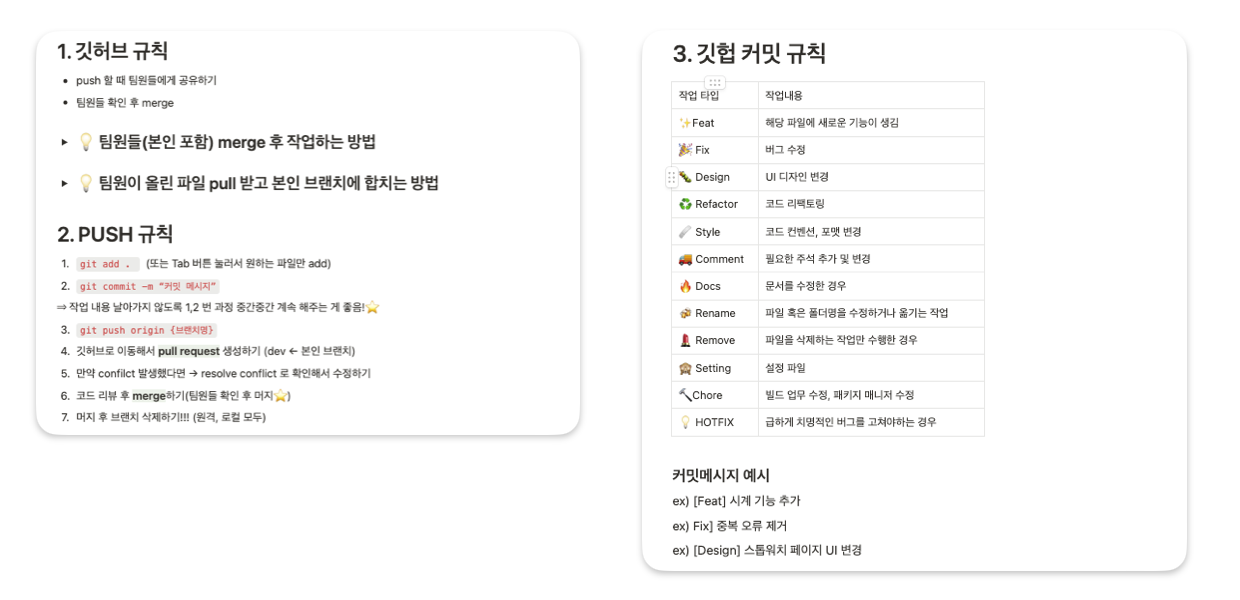
Github Commit Rules & Issue & Pull requests
Github Commit Rules
Issue & Pull requests
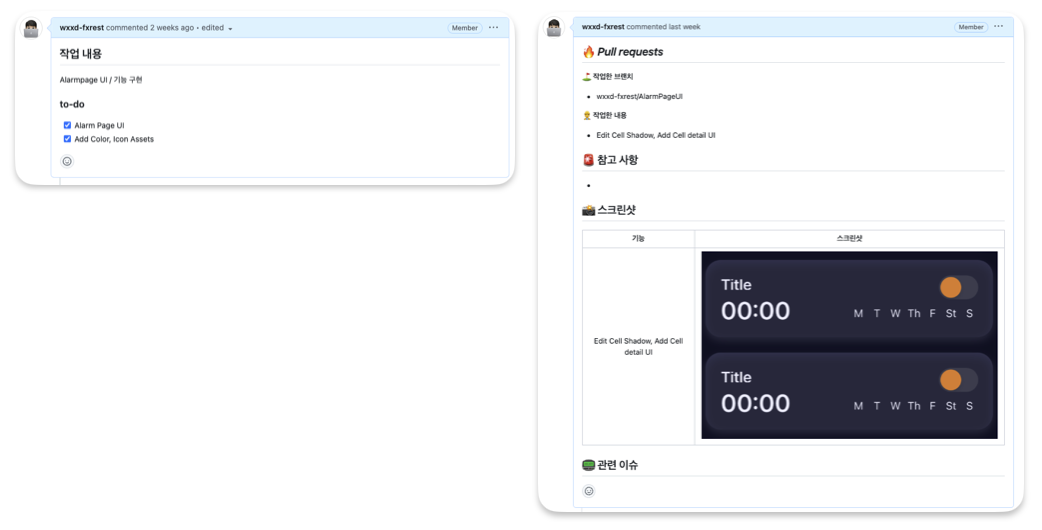
개선해야 할 점 & 느낀 점
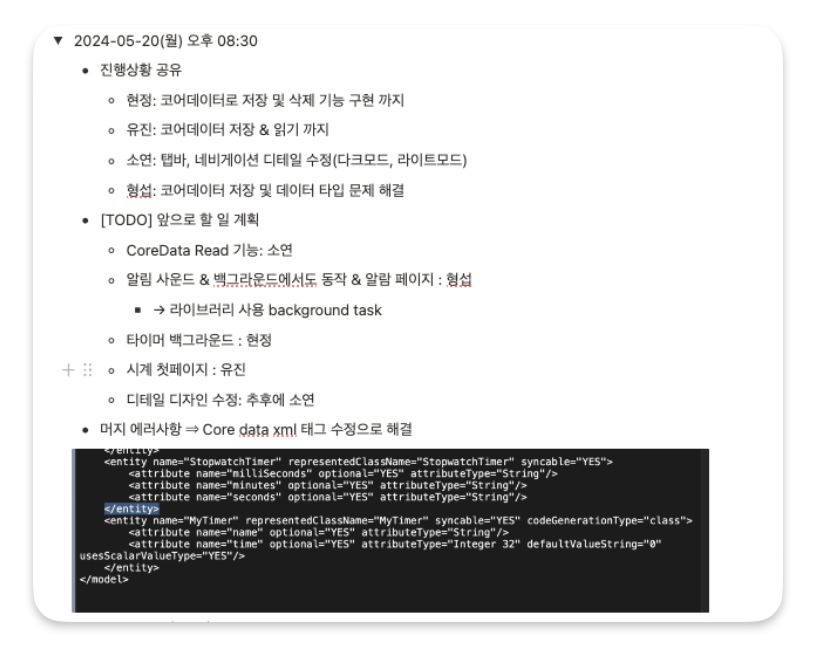
프로젝트 초기에 팀원들과 더 많은 소통이 필요했다는 점, 기획할 때 세부적인 디테일도 계획하고 논의했어야 했음을 느꼈고, 회의록 작성 시 꼼꼼하게 하나하나 작성해야겠다는 걸 배우게 된 프로젝트였다.
개인적으로는 스토리보드를 사용하지 않고 코드 베이스로만 프로젝트를 구현하는 게 처음이다 보니 MVC 또는 MVVM 패턴은 물론이고 코드 분리를 진행하지 못한 게 가장 아쉬웠던 것 같다. 추후 프로젝트 진행 시에는 코드 베이스로 구현하는 데에 무리가 없게 더 열심히 공부해야겠다는 생각이 들었다.
회의록 발췌
일어나시계 시연 영상
일어나시계 github
GitHub - Team-Googling/WakeUpClock
Contribute to Team-Googling/WakeUpClock development by creating an account on GitHub.
github.com